
Key takeaways
- Most support teams building AI aren’t experimenting. They’re prototyping a future state of their support team, where AI does the investigating and humans make the final call.
- General-purpose models are excellent, and a prototype can work within weeks. The hard part is everything around the model: your product's structure, your language, and knowledge that changes with every release.
- Homegrown tools tend to stall in four places: knowledge, trust, orchestration and upkeep.
- The real question isn’t build or buy. It’s what you build yourself, what you build on, and who stays in control of the decisions.
- Start with your own cases. They show you what AI should own first and what’s worth building yourself. Then start small and build on what works, one use case at a time.
What does ARR mean?
One of our customers uses the acronym AR. Ask anyone at that company what it stands for, and they'll tell you it means “automatic review request.”
Ask a general-purpose AI model the same question, and it will tell you, with confidence, that ARR means “annual recurring revenue”.
It's a small example of what many support leaders run into when they build their own AI. The model ends up being wrong, but not because it's weak. It's because nobody taught it the nuances of your company.
More and more of the technical support leaders I meet have already built something. A tool that reads logs. A bot on top of the knowledge base. A routing layer. I think that's a good sign. They believe AI can change how support works, and they're right.
I’d go a step further. Most of them think they’re running an experiment. But I think they’re prototyping the next version of their support team. This article is about what your future team looks like, the four areas that get harder along the way (knowledge, trust, orchestration, and upkeep), and how to decide what you build yourself and what you build on top of.
Why building looks easy now
A few years ago, building your own AI for support was a research project. Today, it's a sprint.
The models are excellent, and they're converging. Some are slower and smarter, others are faster and cheaper, and you can swap one for another without much effort. An engineer can connect one to your knowledge base over a weekend and have a working demo by Monday.
For narrow, structured tasks, those prototypes genuinely work. One VP of global services we spoke with built an internal tool that pulls payment IDs out of logs and pre-fills tickets. It does that job well.
So the question isn't whether you can build something. You can. The question is what happens when it meets your actual queue.
The model was never the hard part. The hard part is everything the model doesn't know about your product and its unique configurations.
What support is starting to look like
Here’s what I see in the teams furthest along.
- AI that investigates, not just answers. The first wave of support AI answered questions. The next one works the case. It reads the logs, checks the version, finds the ticket someone solved three years ago, and hands the engineer a theory. The engineer still makes the call.
- Knowledge that keeps up. Today, someone writes the article after the fact… if they have time. In the teams I’m watching, every resolved case teaches the system something. The docs stop falling a release behind.
- One case, shared across the team. Support, tier 3 and R&D work the same case with the same context. Nobody has to be the glue.
- A team the product org actually listens to. Support sees every bug and every workaround before anyone else does. When AI makes that visible, support stops being where problems end and starts being where the product learns.
Here’s my bet: In the next year or two, the best support teams won’t be organized by tier. They’ll be organized around the problem, with AI doing the investigating and people making the calls.
That’s where the prototypes are pointing, but most builds hit a wall along the way.
Four things that get harder when AI joins the team
In the builds I’ve seen, the tool rarely fails on day one. It stalls when the side project becomes part of the team. That’s when four things get harder.
1. Knowledge: Keeping up with your product, your releases and your people
Your AI is only as good as what it knows about your company, and that knowledge comes in three forms.
First, structure. A complex offering has products, versions, modules, and features that exist in one release but not another. In AI research, we call that an ontology. Every company’s is different, and none of it was in the data a general-purpose model learned from. So when two products both have a user login, the model may answer for the wrong one, with confidence.
Second, change. If your product isn't changing, you have a bigger problem than AI. But every release also changes the right answer. A feature that wasn't supported last week may be supported this week. Was the documentation updated? The internal notes? The answer the bot gave yesterday?
Third, what’s never written down. The workaround a senior engineer knows. The fix buried in a Slack thread. A tool that only reads your docs will never see them.
2. Trust: When AI stops answering and starts acting
The first tools answered questions. The ones teams are building now take action. They route tickets, update records, pull logs, draft the reply and sometimes send it. The VP I mentioned learned this the hard way. His team switched on an AI routing layer, and it started sending tickets to the wrong queues. Every wrong route chipped away at customer trust.
That changes the question. It’s not just “is the answer right?” It’s “what is it allowed to see, what is it allowed to do, and who checks it?” In a recent Talkdesk survey of 252 CX directors, IT and operations leaders, over half named trust in AI decisions as a concern.
A prototype usually skips this part. It works in a demo because a senior engineer is watching every answer. At scale, nobody can watch every answer. The teams doing this well start with a person approving everything. Then they widen what AI can do on its own, one task at a time, as the accuracy proves out.
3. Orchestration: Every handover increases the risk of error
In complex products, hard cases travel. Customer success hands the case to support. Support escalates to tier 2, then tier 3. Tier 3 opens a ticket for R&D. When the fix ships, the news has to travel all the way back. And it’s rarely one bot anymore. It’s a routing agent, a triage agent and a knowledge tool, each built on a different system.
Every handover crosses a system: CRM, ticketing system, Jira, Slack. When those systems don't talk to each other, people become the glue. One senior director described her tier 1 reps as "human bots" moving data between systems. A homegrown tool built on one of those systems inherits every gap. In the new support org, everyone works the same case with the same context.
4. Upkeep: The build is the easy part
Building the first version is the visible cost. Three others show up later.
- Maintenance outlives the build: Models change. Connectors break. Permissions need managing. Quality has to be re-checked every time something moves. The team that built it in weeks or months owns it for years.
- Your roadmap pays for it: Every engineer maintaining support tooling is an engineer not building your product.
- Adoption requires change management: A tool that works in a demo still has to change how your team works every day. That takes as much effort as the build, and it's the part most often skipped.
None of these are reasons to stop building. They’re what a prototype doesn’t have yet, and what the next version of your support team will need.
The real question isn’t build or buy. It’s “who builds what?”
The build vs. buy debate assumes there are only two options:
- Build everything yourself, or
- Buy a product and live with whatever it does
Neither works well for complex technical support. Building everything means owning the infrastructure forever. A one-size-fits-all product means accepting answers designed for someone else's product.
What works is building together
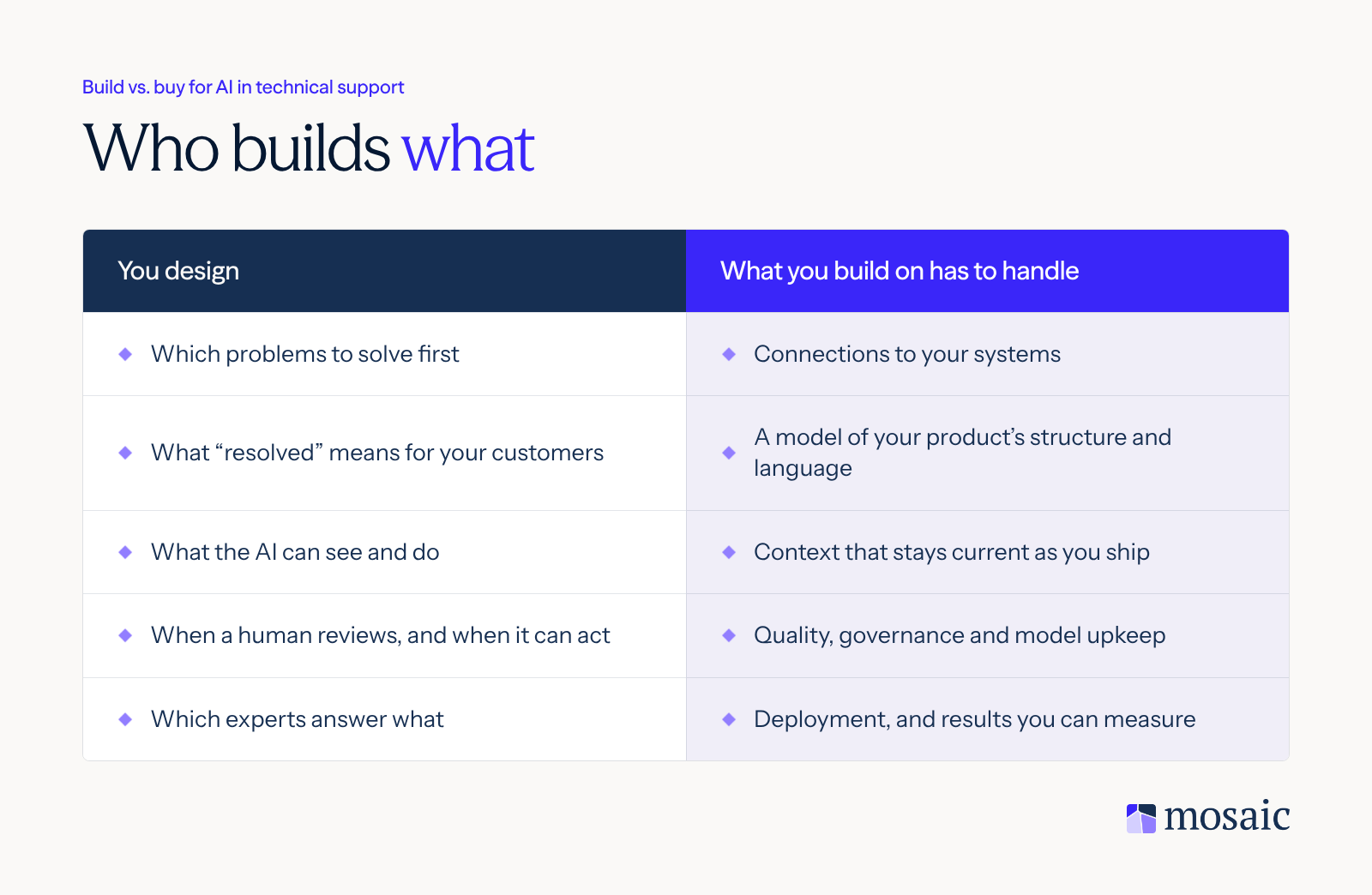
Whatever you build on, that foundation has to do the hard parts: connect your systems, learn your product’s structure and language, keep that context current, and check quality. Then the solution gets shaped around your use cases and your requirements. And your team can still build on top of it using your own agents, dashboards, and workflows.
And you stay in control. You decide which problems to start with. You decide what the AI can see and do. You decide when a human reviews its answers and when it can act on its own. Your experts stay in the loop, and the knowledge they add stays yours.
Where to start: Five questions for support leaders
Whether you’ve already built something or you’re about to, here’s my best advice: start with your own cases, then ask five questions.
Step zero: Look at your own cases
Before you choose a path, look at your own data.
Pull a sample of resolved cases and ask where the time actually went.
The answer is often surprising, because perceived time and actual time are different. Some tasks feel slow and frustrating but take little time, while others eat hours every day. In one diagnostic we ran, the biggest time sink turned out to be summarizing tickets and filing them in Jira.
Another pattern that shows up again and again on a large share of tickets is that the first reply just asks for more information. A screenshot. A version number. A configuration. That one turn can add a day to resolution.
The best way to find these is to watch, not ask. Shadow your engineers as they work real cases. No survey will show you what you'll see there.
Five questions to ask:
- What should AI own first? Your cases will tell you. Look for work that’s high-volume, structured and slow, like asking for logs, summarizing cases or filing to Jira. That’s where AI earns trust fastest.
- Where should your people stay in the loop? Decide upfront which answers a human reviews and which actions AI can take on its own. Then plan to move that line as trust grows.
- What does your AI need to know, and how will it keep up? Products, versions, modules, acronyms. If your AI doesn’t know your product’s structure, it will answer confidently for the wrong one. And every release changes the right answer, so decide how you capture new knowledge from cases and experts beyond what’s in the docs.
- What will you build, and what will you build on? Design the workflows, agents and rules that make your support org yours. Then decide who handles what sits underneath: the connections, the model changes and the quality checks, in year two as well as quarter one.
- What does success look like in a year? Pick outcome metrics like cases resolved, time to resolution, and cases that never came back. Then ask what your team looks like when you hit them.
Your answers won’t tell you whether to build or buy. They’ll show you where to start, what’s worth designing yourself, and what you need to build on. Wherever you land, keep control of the decisions.
Don't buy a dream
The support leaders I work with are under real pressure. Their CEO wants results from AI, and wants them yesterday. Often the ask seems simple on the surface. Can’t we just build this ourselves?
That pressure makes the big project tempting, whether it’s an internal build or a year-long consulting engagement. It also makes it risky, because those projects often don’t finish on time, if they finish at all.
My advice is to say yes. You are building. You’re building the next version of your support team. Just don’t spend the next two years building the foundation underneath it.
When the question comes up, try something like:
“Yes, we’re building. We’re designing how AI and our team work together, and we’re building it on a foundation so our engineers stay focused on our product.”
Point of Rental tried building first. Brooke Ryan, SVP of Global Support, put it this way: “We realized pretty quickly this wasn’t our core business. We could see the value, but we also knew we’d always be behind companies that do this full time.”
What works is stepping stones. Start with the problem your cases point to. Show results in weeks, not quarters. Then add the next use case, and the next. Point of Rental took that path and saw 44% faster case resolution and 92% CSAT.
Your CEO doesn’t want to buy a dream, and you shouldn’t have to sell one. Your engineers should be building your product. Your support team should be solving your customers’ hardest problems. And the AI that helps them should know your company as well as they do.
Support has always seen the product first. The leaders who shape what their team becomes now are the ones who’ll have a seat at the table when the rest of the company catches up.
So keep building. You’re the ones designing what support becomes. Our job is to back you with the foundation underneath, so your team can focus on the part that’s yours.
Already building? Let’s scale it. Send us a sample of your cases. We’ll show you where your team’s time actually goes, what’s worth building next, and what it takes to scale.